ATS friendly resume
Many companies collect applications in an applicant tracking system. If the system cannot read your resume properly, the person on the other side may never see your strengths. This guide explains what an ATS does and how to make your file easy for it to read.
What an ATS actually does
An applicant tracking system (ATS) is software that employers use to collect, store and search applications. When you upload a resume, the system reads the file, extracts the text and tries to sort it into fields: name, contact details, job titles, employers, dates, education and skills. A recruiter can then search and filter those fields, for example by a job title or a skill.
Two points are worth keeping in mind. First, in most systems a person, not the software, decides who goes forward; the ATS is mostly a filing cabinet with a search box. Second, different systems behave differently, so nobody can promise that a resume will "pass" every ATS. What you can do is remove the common things that make reading fail.
Layout: keep it simple
- One column. Many systems read a page from the top to the bottom, left to right. A resume with a side column can come out with the sidebar mixed into the main text. Single column is the safe choice.
- Plain structure. A name at the top, then sections with clear headings, then entries in the same order every time (title, employer, dates, bullets).
- Standard fonts and sizes. Use a common font at 10 to 12 points. Decorative fonts can break when characters are extracted.
- Normal bullets. Simple round bullets are fine. Avoid unusual symbols.
- Margins and spacing. Ordinary margins and space between sections help both humans and parsers.
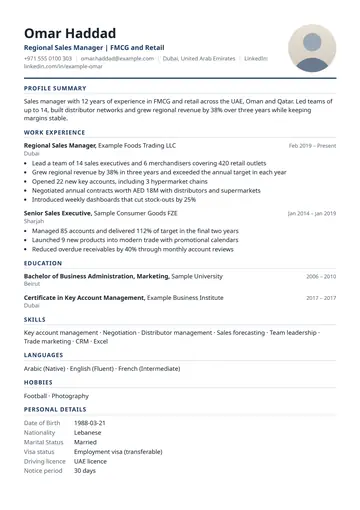
File format: a real text PDF
Use a PDF that contains real text, not a picture of text. If the file is a scan or an exported image, the system has nothing to read. To check yours, open the PDF and try to select a line of text with the cursor or your finger; or copy the whole page and paste it into a plain text editor. If the text appears in a sensible order, a system can read it too.
Some employers ask for a Word file (.docx) instead. Follow the instructions in the job ad. If no format is given, a text PDF keeps your layout the same on every device. Do not send a JPG or PNG of your resume as the application file. Images are useful for sharing in a chat, but not for a system that reads text.
Headings the system recognises
Name your sections with the words most employers use, so the parser can put the content in the right field. Safe choices are:
- Summary, Professional Summary or Profile
- Work Experience or Experience
- Education
- Skills
- Projects
- Certifications
- Achievements or Awards
Clever headings such as "My journey" or "What I bring" are charming for people but can leave a system unsure what the section is. If you want personality, put it in the summary and the bullets.
Keywords from the job ad
Recruiters often search for words: a job title, a tool, a certification. Your resume should use the same words the job ad uses, as long as they are true for you.
- Read the job ad and underline the skills, tools and qualifications mentioned more than once.
- Check that each one you genuinely have appears in your resume, in your summary, skills and experience bullets, with the same wording. If the ad says "customer relationship management", write that, and consider adding "CRM" in brackets.
- Show the keyword in use. "Managed a team of 6 using Jira to track sprint work" is stronger than the word "Jira" alone in a list.
- Do not stuff. Repeating a word ten times, or hiding keywords in white text, is easy for a person to spot and can get an application rejected.
A worked example. A job ad for a "Junior Accountant" says: "Tally, GST filing, bank reconciliation, MS Excel". A fictional candidate, Rahul Verma, has all four. His skills line reads: "Tally Prime, GST return filing, bank reconciliation, advanced Excel (VLOOKUP, pivot tables)", and his experience bullet says: "Prepared monthly bank reconciliation for 4 accounts in Tally and filed GSTR-1 and GSTR-3B on time." Both the exact words and the evidence are present.
Dates, titles and contact details
- Use one date format everywhere, such as "Jan 2023 to Mar 2025" or "01/2023 to 03/2025". Mixed formats confuse the sorting of your history.
- Write job titles as they were. You can add a clearer equivalent in brackets if your official title is unusual.
- Put your contact details in the body, not only in the page header or footer. Some systems skip headers and footers entirely, and your phone number would be lost.
- Spell out, then abbreviate on first use: "Search Engine Optimisation (SEO)".
- Avoid gaps without a note. If there is a break, a one-line explanation such as "Career break, family care" is better than an unexplained hole.
Things that break parsing
- Text inside images, including logos with your name and screenshots of certificates.
- Tables and text boxes used for layout. Some systems read tables cell by cell in an order that scrambles the meaning.
- Headers and footers holding important information.
- Skill bars, star ratings and graphs. They carry no readable text and tell the reader little.
- Icons instead of words for phone, email or location. Write the words or the number itself.
- Unusual fonts and special characters that turn into question marks.
- A scanned or photographed resume saved as a PDF.
A photo is a special case. A small photo is not read as text, but it can disturb the order of the content in some layouts. In countries where employers do not expect photos, leave it out.
File naming
Use a simple, readable name such as "Rahul-Verma-Accountant-Resume.pdf". Avoid "resume final v7 (2).pdf". A clear name helps the recruiter find your file in a folder of hundreds, and some systems show the file name to the reader.
A checklist before you apply
- Single column, plain structure.
- Real text PDF (select the text to check) or the format the employer asked for.
- Standard headings: Summary, Experience, Education, Skills.
- Contact details in the body of the page.
- Key words from the job ad appear, in the same wording, backed by examples.
- One date format throughout.
- No text in images, no tables for layout, no skill bars.
- Copy and paste the page into a plain text file: does it read in the right order?
- File named with your name and role.
- Read it once more as a person: is it clear, honest and easy to scan?
The same checklist works for a first resume. For a layout aimed at students, see the fresher resume format guide.
Checking it in Sezarr Resume
Sezarr Resume is an Android app that makes resumes, CVs, cover letters and marriage biodata. It exports a real text PDF, so the text can be read by a system, and it has an ATS check that works by simple rules: it looks for missing sections, length, dates, contact details and the keywords from a job ad that you paste in. It is a checklist, not AI, and it cannot promise how any particular employer's system will react. Export has no watermark and needs no sign-up. The app is in closed testing on Google Play and coming soon; see the Sezarr Resume page. If you also need a marriage biodata, see the biodata format guide.
Questions people ask
What is an ATS-friendly resume?
A resume built so that applicant tracking software can read its text and sort it into the right fields: single column, real text PDF, standard headings and consistent dates.
Is a PDF or Word file better for an ATS?
Either can work. Follow the employer's instructions. A text PDF keeps your layout fixed; check that you can select the text in it.
Can an ATS read a two-column resume?
Some can, some mix the columns together. A single column is the safe option.
How do I use keywords from a job ad?
Use the same words for skills and tools you really have, and show them in use in your experience and project lines. Do not repeat them to fill space.
Should I put my contact details in the page header?
Put them in the body. Some systems ignore headers and footers.
Does an ATS score mean I will get the job?
No. Scores from checkers differ from one tool to another and from real employer systems, and a person usually makes the decision. Treat any check as a guide.