Resize a photo or signature to 20 KB, 50 KB or 100 KB
Online forms usually want a JPG photo and signature within a KB range and sometimes at an exact pixel size. This guide shows how to hit both with Photo to KB in PDF Maker, and how to make a picture bigger when a form sets a minimum.

Resize a photo to a KB size
Resize a signature
The tools above work in your browser: your files stay on your device and are not uploaded. The steps below are for PDF Maker, our Android app, which does the same on your phone, works offline and has more options.
The steps in PDF Maker
- Open PDF Maker and tap Photo to KB.
- Tap Choose a photo (or From files) and pick the picture.
- Under Size preset, pick a general size (Photo up to 100, 200 or 500 KB, Signature up to 50 KB, Document photo up to 1 MB) or the preset of your exam or form.
- To match your form exactly, tap Edit the limits and set Min KB, Max KB, Width px and Height px. Choose how the picture fills that size: Crop to fill, Stretch or Fit on white.
- Tap the button, which names the range: for example Make it 20 to 50 KB.
- The result shows the final size, the pixel size and the JPEG quality used. Save it or share it to the form.
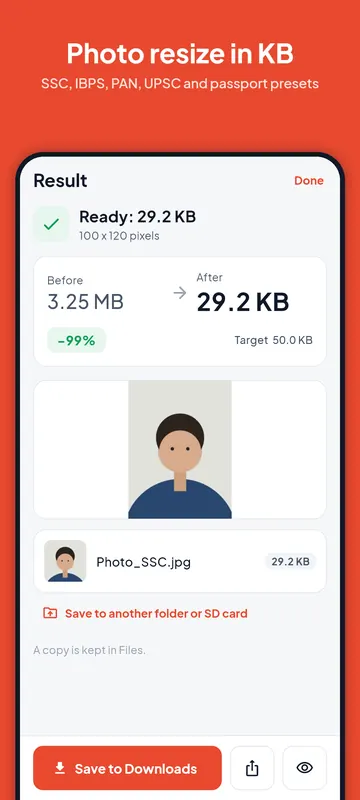
You can save your edited numbers to the preset or as a new preset of your own, so the next form takes one tap.
Resize a photo to 20 KB
20 KB is the usual ceiling for signatures (SSC, IBPS and SBI ask for 10 to 20 KB) and for a few photos, such as the NSDL PAN photo (up to 20 KB at 197 × 276 pixels). At 20 KB a photo has to be small in pixels as well: a face at 200 × 230 pixels fits easily, a full 12-megapixel camera photo does not. If the form gives a pixel size, enter it; if not, the app shrinks the picture until it fits.
Resize a photo to 50 KB
20 to 50 KB is the most common photo range on Indian recruitment forms: IBPS and SBI use it at 200 × 230 pixels, and our SSC preset uses the same range. Pick the exam's preset, check the numbers against your notice, and tap Make it 20 to 50 KB. The app keeps as much quality as the range allows.
Resize a photo to 100 KB
100 KB leaves room for a sharp photo. The general Photo (up to 100 KB) preset is a good default when a form only says "under 100 KB". IBPS and SBI ask for the handwritten declaration as a 50 to 100 KB image at 800 × 400 pixels; there is a preset for that too. For a PDF rather than a photo, use Reduce PDF size.
Signature to KB
Sign in black or blue ink on plain white paper, take the photo in good light, and crop close to the signature. In Photo to KB, pick your form's signature preset or Signature (up to 50 KB). Most exam signature presets use Fit on white, so the whole signature stays in the frame on a white background instead of being cut off; with the general preset, choose Fit on white under Edit the limits. If a form gives a size such as 140 × 60 pixels, enter it under Edit the limits.
When a form sets a minimum KB
Some forms reject files that are too small, for example "between 20 KB and 50 KB". Set Min KB as well as Max KB. If the finished picture is still under the minimum, the app adds blank filler bytes to the file to reach it. The picture itself does not change, and the form accepts the file size. The app counts a minimum with 1024 bytes to the KB, plus a little margin, so it passes whichever way the form counts.
Pixels, KB and format: what forms ask for
A form can set three things. The pixel size (for example 200 × 230) is the shape and detail of the picture. The KB size is how big the file is; it depends on the pixels and the JPEG quality. The format is almost always JPG. The app always saves JPG in Photo to KB. Our exam size table lists the numbers for SSC, IBPS, SBI, RRB, UPSC, NEET, JEE Main, CUET UG, MPSC, PAN and Passport Seva, with their sources.
Form sizes change between notices. Always check the notice you are applying under, and edit the numbers in the app if they differ. PDF Maker is not connected to any exam board or government body.
Free plan and Pro
Each finished photo uses one of the 5 free size-target exports of the day. Pro removes the limit and adds shrinking many pictures at once in Image tools.
Questions
How do I reduce a photo to 20 KB without it looking blurry?
Use the pixel size the form asks for instead of the full camera size. A small, sharp picture at 200 × 230 pixels fits 20 KB with good quality; a huge picture squeezed to 20 KB does not.
Can I increase a photo's size in KB?
Yes, for forms with a minimum. Set Min KB and the app pads the file with blank bytes up to that size. The picture stays the same.
Which format does the app save?
JPG, which is what forms ask for.
Are the exam presets official?
They come from the official notices where we could check them, and each preset shows its last check date. Rows we could not match to the current notice are marked. Always read your own notice before you upload.