Merge PDF files on your phone, then split or reorder pages
Portals often want one PDF with everything in it, or the opposite: one file per document. PDF Maker joins, splits and reorders PDFs on your phone, with no daily limit and no watermark.

Merge PDFs
Split or extract pages
Rotate or delete pages
The tools above work in your browser: your files stay on your device and are not uploaded. The steps below are for PDF Maker, our Android app, which does the same on your phone, works offline and has more options.
Merge PDFs into one file
- Open PDF Maker and tap Merge PDF.
- Tap Add PDFs and pick two or more files. You can also share several PDFs to the app at once from your file manager or email.
- Drag the files into the order you want. They are joined in the order shown; the screen shows the number of files and pages in total.
- Tap Merge, then save or share the new PDF.
Merging keeps the text and pictures of every page as they were, so the result is as sharp as the originals. A PDF locked with a password needs to be unlocked first.
Split a PDF
- Tap Split PDF and choose the file.
- Under Split by, choose Page ranges or Every N pages.
- For ranges, type the pages, for example
1-3, 5, 8-. A dash with nothing after it means "to the last page". - Turn on Put all chosen pages in one file to get a single PDF of just those pages (handy for pulling two pages out of a long document). Leave it off for one file per range.
- Tap Split. The app shows the plan first, for example "3 files: 1-3, 5, 8-12".
Each piece keeps the text and pictures of its pages exactly as they were.
Reorder, turn or delete pages
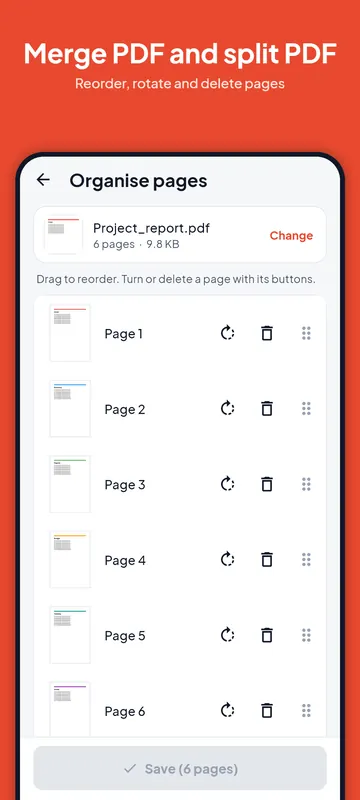
Organise pages shows every page of a PDF. Drag a page to move it, use its buttons to turn it right or delete it, and tap Start over if you change your mind. Saving keeps the text and pictures of every page. Removing pages a form does not need is also the easiest way to make a PDF smaller.
Merged file too big for the portal?
Joining several scans adds up quickly. After merging, open Reduce PDF size and pick the portal's limit, for example 2 MB or 500 KB. The compress guide explains what each size can hold. If a portal wants separate files under a size each, split first and reduce each part.
Free with no daily limit
Merge PDF, Split PDF and Organise pages are free on every plan, with no daily limit, and the app adds no watermark. Your files are joined and split on the phone and never uploaded.
Questions
How many PDFs can I merge?
Two or more, with no daily limit. Free files can be up to 100 MB each, Pro files up to 400 MB.
Does merging reduce quality?
No. Pages are copied as they are. Only Reduce PDF size makes pages lighter, and only when you ask it to.
Can I merge photos into a PDF?
Use Image to PDF for photos: each picture becomes a page, in the order you choose.
Can I take a few pages out of a PDF?
Yes. In Split PDF, type the pages you want and turn on "Put all chosen pages in one file".